
 Login
Login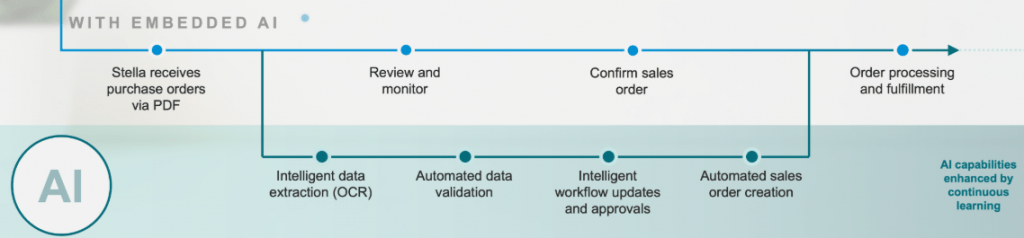

Artificial Intelligence(AI) & Machine Learning(ML) in SAP S/4HANA:Transforming Enterprise Operations
I have seen the module evolve from being purely transactional to becoming a key driver of customer experience and revenue performance. What excites me about AI now is how it can finally unlock the next level moving from reactive order processing to intelligent, predictive selling.
AI can help us optimize pricing in real time, anticipate customer needs based on buying patterns, and even automate complex order management scenarios. It’s no longer just about automating tasks it’s about transforming how sales and distribution contribute to the business.
With AI, I see huge potential to reduce order errors, improve delivery commitments, and give sales teams the insights they need right when they need them. It’s the kind of evolution that brings together both efficiency and strategy. And honestly, after a decade and a half in this space, that’s the kind of shift that gets me genuinely excited.
Let’s talk about what is Artificial intelligence, Machine learning in simple term.
Artificial Intelligence (AI) is the computers or machines being made to think and decide like humans. It’s about putting machines in a position where they can do things that typically need to be done by human intelligence — like interpreting language, identifying pictures, solving mysteries, or making decisions.
Machine Learning (ML) is either a sub-domain (or subset) of AI. It’s the way that we’re teaching machines to get intelligent independently. We’re not writing each of the rules but giving them many data and that machine would observe patterns over this data. After that, whenever it could be able to independently make a choice or forecast.
Basic example:
If AI has to do something like instructing a robot about recognizing fruits
So ML is kind of like demonstrating the robot pictures of apples, bananas, and oranges — and letting it learn what each of them looks like, instead of explaining to it all the rules
Introduction of AI and ML in SAP
SAP S/4HANA, the cutting-edge ERP suite, is transforming the way businesses operate by incorporating advanced technologies like Artificial Intelligence (AI) and Machine Learning (ML). These innovations boost automation, refine decision-making, and maintain data integrity across a variety of industries. In this blog, we’ll dive into how AI and ML are woven into SAP S/4HANA and explore their practical applications in the real world.
Artificial Intelligence (AI) & Machine Learning (ML) in SAP S/4HANA
SAP S/4HANA leverages AI and ML to automate processes, reduce manual work, and provide predictive insights. Below are some key functionalities:
Sales & Customer Experience
1. Automated Sales Order Processing: AI-powered chatbots process customer inquiries and create sales orders automatically, improving response times.

2. Leverage Joule
Joule is capable of creating sales orders in both the SAP S/4HANA Cloud Private Edition and the Public Edition. It’s also a handy tool for managing various aspects of sales orders, including: –
- Creating sales orders based on other documents: Joule can generate new sales orders by referencing existing sales orders, quotes, or contracts.
- Generating sales order requests: It can assist users in crafting sales order requests by pulling information from unstructured data like PDFs or images.
- Modifying sales order fields: Users can easily update fields at both the header and item levels with Joule.
- Addressing sales order fulfilment issues: It’s equipped to help users tackle any problems related to fulfilling sales orders.
- Navigating to relevant apps: Joule can direct users to specific applications within SAP S/4HANA Cloud, such as the “Track Sales Orders” app.
- Retrieving sales order information: It can deliver summaries and detailed insights about sales orders, including document flow and pricing condition
3. AI-Based Sales Order Autocompletion:
Functionality: SAP S/4HANA Cloud Public Edition offers AI-driven autocompletion, which uses historical data and machine learning to provide intelligent recommendations for completing sales order data.
Example: The system can suggest the correct shipping address, payment terms, or material details based on past orders with similar characteristics.
SAP Fiori App: The “Monitor Recommendations for Sales Document Completion” app provides a central entry point to view incomplete sales orders and corresponding data field recommendations.
4. Importing Sales Orders from Excel Spreadsheets:
Functionality: You can use the SAP Fiori app “Import Sales Orders” to batch-create sales orders directly from Excel files.
Process:
- Upload the Excel file containing the sales order data.
- The system automatically creates sales order requests and populates the data.
- You can then simulate or create the sales order.
SAP BTP Use Case: SAP Business Technology Platform (BTP) can be used to automate sales order creation from Excel files, leveraging robotic process automation (RPA) to extract data from Excel and create sales order documents in SAP S/4HANA.
5. Automating Sales Order Creation from Unstructured Data:
Functionality: You can use SAP Build Process Automation to create an RPA bot to automate the processing of sales order requests received in the form of unstructured files like PDFs, images, etc
Process:
- The bot scans emails for keywords in the subject line.
- It extracts attachments from the emails and uploads them to the “Create Sales Orders – Automatic Extraction” app.
- The app creates sales order requests and uploads the email attachments to a document information extraction service.
- The service extracts relevant information from the email attachments.
6. SAP Sales Cloud Version 2, duplicate detection
Sales agents can leverage the feature that performs a check, comparing the configured fields with the list of existing accounts within the system. As an administrator, they can configure the duplicate check for accounts. Once configured, any new account that is created is checked against the configured fields and the result displays a list of the existing accounts with a confidence score, which enables sales agents to take a decision whether or not to proceed with the account creation.
Benefits
- Prevent from creating more duplicate records, improving data accuracy
- Ensure a cleaner database for operations and sales forecasts
The post Artificial Intelligence(AI) & Machine Learning(ML) in SAP S/4HANA:Transforming Enterprise Operations appeared first on ERP Q&A.

