
 Login
Login

The Ultimate Guide to Master SAP MM-FI Integration
SAP MM deals with the procurement of material & services.
Mastering MM-FI integration is crucial in SAP financial control. Mastering MM-FI integration helps to ensure that financial statements accurately reflect the true cost of materials and inventory.
With this Ultimate Guide to Master SAP MM-FI Integration, we will help businesses to make informed decisions about procurement, production, and overall financial health.
Note: This post is solely for automatic determination of GL in MM (OBYC). To check the configuration of SAP MM-FI integration other than the OBYC, please see the below post
Ultimate guide to configure S4 HANA MM-FI Integration
--> When we procure material or services, we need to pay to the supplier of material or services.

--> to pay to supplier correctly & timely it is very crucial to record the amount to be paid correctly & on time.

--> In simple terms, MM-FI Integration orchestrates the posting of values in tandem with different quantity movements.
SAP MM FI integration does this crucial work of keeping the correct & on time record of amount to be paid to the suppliers.
1. How MM-FI Integration Works
MM FI integration keeps records of values on the GL (General Ledgers)
Before we go into the detail , we need to first examine what are the expectations from the SAP MM FI integration in order to pay suppliers correctly & on-time.
1.1 Expectations & Solutions from MM-FI integration
Below are the typical characteristics of the business which should be taken care by MM FI integration.
1.1.1 Keep Record as Material Moves
in an organization, material moves due to several reasons. For example-
- Receipt of the material from external vendor
- Receipt of the material from production
- Issue of the material for production
- Scrapping of the materials
MM FI integration should capture this movement & record the values on GLs in real time as soon as material moves.
Below are the Elements used by SAP to fulfill this requirements
a) Movement Type
A movement type is a three digit/character identification key for a
goods movement. for example – 101 for Goods receipt, 201 for goods issue against cost center , 261 is goods issue against order etc.
b) Value String
Value string is assigned to each relevant movement type in inventory management. Value strings contain keys for relevant posting transaction such as BSX, WRX etc. For Example – movement type 101 contains the value string WE01
c) Transaction/Event keys
Transaction event key is to determine different GL for different business transactions. For example- BSX is used fort stock posting & BSV for change in stock value.
1.1.2 Keep Record for Materials having Different business Characteristics
Organizations has different type of materials like -Raw materials which are used as input for production process.
Semifinished materials might be produced in a production process which can be further consumed to produce final finishes product
MM FI integration should record the values on GLs according to the characteristics of the materials. For example – values for the Raw materials should be captured on the different GL account compare to the semi finished materials for the goods receipt against production order.
or value of the scrapping of the raw material should be captured on different GL account compare to the scrapping of the finished material.
Below are the Elements used by SAP to fulfill this requirements
a) Valuation Class
Valuation class if like further extension of material types.
For example – Material Type – RAW can have two valuation classes as 3100 – Raw material Domestic & 3110 Raw material Imported.
b) Account Modifier / Account Grouping Code
Account Modifier or Account Grouping Code is a three-character code used to differentiate the offsetting accounts
For example- Event is goods issue . But this goods issue can be for goods issue to a production order or for a scrapping etc.
So Account modifier or account grouping code is used for different scenarios like goods issue, scrapping, physical inventory to assign different accounts (for example, consumption account, scrapping etc.)
Another example
Business wants to post price differences to difference accounts in case of goods receipts for purchase orders compare to goods receipts for production orders.
--> Account grouping is used only for offsetting entries, consignment liabilities, and price differences.
1.1.3 Post Values as per the Org Structure
The two main organization structure elements in FI & MM are Company code & Plant.
Below elements are used by FI MM integration to post correct values here.
a) Valuation Area
Materials are valuated at plant level or at company code level.
- If valuation is at plant level, then valuation area is plant.
- If valuation is at company code level, then valuation area is company code.
Hint : Generally Valuation area should be plant otherwise it will be difficult to control the costing of the product.
b) Valuation Area Grouping
Valuation grouping code is used to determine the GL code for more than one valuation areas similar or different.
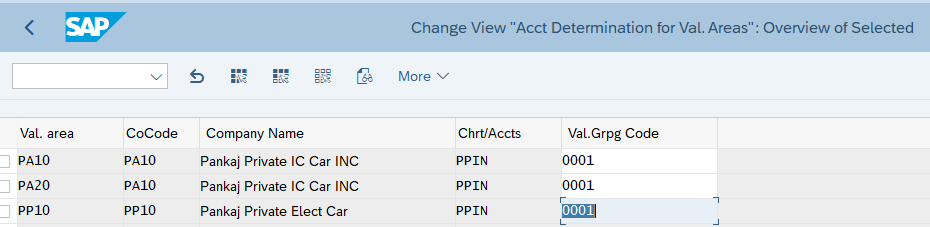
Our Car business has three plants -PA10, PA20 & PP10 (Valuation Area is plant).
Though PA10 & PA20 plants belongs to different company code compare to PP10, but they use the same chart of account.
We want to post transactions for these plants to the same accounts so we will group these three valuation areas under a single valuation grouping code.
We will group together all our three valuation areas. We will group our valuation areas (plants) PA10, PA20 & PP10 to 0001
This will avoid to configure account determination separately for all plants as shown below
Below is the path to group the valuation areas
SPRO –> IMG –> Materials Management –> Valuation and Account Assignment –> Account Determination –> Account Determination Without Wizard –> Group Together Valuation Areas
2. Configure SAP MM FI Integration
Now we are ready to configure the automatic account determination (SAP MM FI integration) by using the elements explained above
- Material Movement
- Movement Type
- Value String
- Transaction/Event keys
- Different Material Type
- Valuation Class
- Account Modifier / Account Grouping Code
- Organization Structure
- Valuation Grouping Code
To configure start transaction “OBYC”
Please note that for each business scenario we will explain
- Transaction/event keys associated with the business scenario.
- Account Modifier/Account grouping code (if relevant).
- GL used (click against each scenario to check the GL creation in detail).
- We have already configured Valuation grouping code as “0001”. Please click HERE to see the details
3. MM FI Integration Configuration for Different Business Scenarios
Now we will configure FI-MM integration (Automatic account determination) for different business scenarios
3.1 Scenario 1 :Goods Receipt Against Standard Purchase Order
Below are the values of the five elements to configure the FI MM Integration (automatic account determination) for the different events which happens as a result of Goods receipt against purchase order.
3.1.1 Increase in Inventory Value
The first event is – inventory value is increased by the value of the goods purchased. Increase in Inventory Value is posted on the GL accounts through Key BSX. This increase is value is captured & post as shown below.
a) For Raw Material (ROH)
Since the inventory value is increasing so it will be a debit (Dr) transaction
- Transaction Key – “BSX”
- Valuation Class – “3000”
- Account Modifier/Grouping Code – Not Applicable
- Valuation Grouping Code – “PPIN”
- Posting on General Ledger – “113100000” (PPIN-Inventory – Raw Material). Click HERE for detail.
b) For Trading Material (HAWA)
Since the inventory value is increasing so it will be a debit (Dr) transaction
- Transaction Key – “BSX”
- Valuation Class – “3100”
- Account Modifier/Grouping Code – Not Applicable
- Valuation Grouping Code – “PPIN”
- Posting on General Ledger – “113600000” (PPIN-Inventory – Trading Goods). Click HERE for detail.
c) For Semi-Finished Material (HALB)
Since the inventory value is increasing so it will be a debit (Dr) transaction
- Transaction Key – “BSX”
- Valuation Class – “7900”
- Account Modifier/Grouping Code – Not Applicable
- Valuation Grouping Code – “PPIN”
- Posting on General Ledger – “113300000” (PPIN-Inventory – Semi-Finished Goods). Click HERE for detail.
d) For Finished Material (FERT)
Since the inventory value is increasing so it will be a debit (Dr) transaction
- Transaction Key – “BSX”
- Valuation Class – “7920”
- Account Modifier/Grouping Code – Not Applicable
- Valuation Grouping Code – “PPIN”
- Posting on General Ledger – “113400000” (PPIN-Inventory – Finished Goods). Click HERE for detail.
e) FI MM Integration Configuration for Increase in Inventory Value
Start OBYC and select Transaction as “BSX”.

Input Chart of Account as “PPIN”
Now configure as per the values given above

Since Valuation Modifier 0001 is a grouping of our all three plants (Valuation area PA10, PA20 & PP10) so this configuration is completed for all the three plants.
Note
Please click HERE to check the creation of GL account 113600000
3.1.2 GR/IR Posting
In accounting if there is a Positive (+ve) entry then there has to be a negative (-ve) entry to clear it in further transaction.
Here since increase in stock value was a +ve entry , so -ve entry will be on GR/IR account
3.1.2.1 FI MM Integration Configuration for GR/IR Postings.
WRX is the accounting key to post on GR/IR
WRX is maintained at client level . It means it is same GL for all valuation class, valuation grouping code etc.
- Transaction Key – “WRX”
- Valuation Class – Not Applicable (but we can use)
- Account Modifier/Grouping Code – Not Applicable
- Valuation Grouping Code – “PPIN”
- Posting on General Ledger – “221120000” (PPIN-Goods receipt/Invoice Receipt). Click HERE for detail

3.1.3 Price Difference Posting
How Price difference is posted
- For materials with price control indicator as ‘V’, while posting invoices, the difference will go to Price Difference A/c if the stock is not there.
- For materials with price control indicator ‘S’, while making GR (either against Purchase Order or otherwise), the difference between the PO price and the standard price will go to Price Difference.
- Production Order variances also gets posted to Price Difference A/c, with offset to COGM A/c.
--> We have created two Price variance (Difference) accounts

     552041000 - PPIN-LOSS PRICE VARIANCE
     552541000 - PPIN-GAIN PRICE VARIANCE
3.1.3.1 FI MM Integration Configuration for Price Difference.
For price difference we work with & without account modifier
Below are the rule for OBYC settings for PRD
- Account modifier is not used for Goods & Invoice receipts against Purchase Orders
- PRF for GR against Product Order & Order Settlement
- PRA for Goods Issues
- PRU for transfer postings.
Please see below the OBYC configuration screenshot for our car business

3.1.4 Freight Posting
If we use delivery cost in the PO price schema then we need to post the fright charges to the relevant GL accounts.
System will search the GL account corresponding to the posting key which is used against freight condition type.
Here system is searching GL account for Key FR1 because in our pricing schema we have used key FR1 for condition “FRC1”. And in PO we have used condition “FRC1″for freight charges. Please check in detail HERE
Please check the pricing schema from the link to the post given below
Ultimate Guide to MM Pricing in 5 Easy Steps
3.1.4 FI MM Integration Configuration for Freight Charges.
We will use GL 221730000-PPIN-Freight Clearing Account (MM)
Please click HERE to check the creation of GL account 221730000 step by step

3.1.5 Scenario 1: Testing
Now we will test for the FI-MM integration configuration as done above for scenario 1
3.1.6 PO Price Detail
We have posted goods receipt for a PO of Finish Material number 12 (Finished Car Model D)
Below is the detail Price break up of the 10 EA in PO
Base Price (from Info Record) =99900 USD
Surcharge (Manually Entered)  =9909 USD
                                --------------------
Net Value (Base for Taxes)        = 109890 USD
                              ---------------------
A/P Sales Tax 1 Inv.	6.000 %	= 6593.40 USD
A/P Sales Tax 2 Inv.	3.000 %	= 3296.70 USD
A/P Sales Tax 3 Inv.	1.000 %	= 1098.90 USD
                              --------------------
Total Tax                                   = 10989 USD
                              --------------------
Net Value (Including Taxes)      = 120879 USD
                              --------------------
Freight (Manually Entered)       = 1000 USD
            _______________________________________________
Actual Price                            = 121879 USD
            _______________________________________________
3.1.7 Posting on the GL in FI Document
After GR system has posted FI document as shown below

3.1.7.1 Analysis of FI Document GL Postings
- Amount posted on the inventory is exactly same as material value in material master due to standard valuation
- The difference in the total value (minus freight) and material value is posted on the Price variance loss account as explained HERE
- Freight amount is posted to a separate Freight clearing account as explained HERE
3.2 Scenario 2: Initial Stock Load
Below are the values of the five elements to configure the FI MM Integration (automatic account determination) for initial stock load.
3.2.1 Increase in Inventory Value
Due to stock load inventory value will be increased. This increase is value is captured through transaction key “BSX” & post same as shown above in goods receipt against purchase order.
Click HERE to go to the relevant section
3.2.2 Offsetting entry to increase in Inventory Value
GBB is the accounting key for “Offsetting entry for inventory posting”. Further as explained previously account modifiers are used to tell the system against which account the offsetting entry to inventory should be accounted. Some example are -VAX: for goods issues for sales orders, VBR: for internal goods issues (for example, for cost center), VNG: for scrapping/destruction etc.
a) For Raw Material (ROH)
- Transaction Key – “GBB”
- Valuation Class – “3000”
- Account Modifier/Grouping Code – “BSA”
- Valuation Grouping Code – “PPIN”
- Posting on General Ledger – “339911000” (PPIN-Inventory – Initial Entry of Raw Material Balances). Click HERE for detail
b) For Trading goods (HAWA)
- Transaction Key – “GBB”
- Valuation Class – “3100”
- Account Modifier/Grouping Code – “BSA”
- Valuation Grouping Code – “PPIN”
- Posting on General Ledger – “339912000” (PPIN-Inventory – Initial Entry SF & Finish Goods Balances). Click HERE for detail
c) For Raw Material (HALB)
- Transaction Key – “GBB”
- Valuation Class – “7900”
- Account Modifier/Grouping Code – “BSA”
- Valuation Grouping Code – “PPIN”
- Posting on General Ledger – “339912000” (PPIN-Inventory – Initial Entry SF & Finish Goods Balances). Click HERE for detail
d) For Finished Material (FERT)
- Transaction Key – “GBB”
- Valuation Class – “7920”
- Account Modifier/Grouping Code – “BSA”
- Valuation Grouping Code – “PPIN”
- Posting on General Ledger – “339912000” (PPIN-Inventory – Initial Entry SF & Finish Goods Balances). Click HERE for detail
e) FI MM Integration Configuration for Initial Stock Load
As usual start OBYC. Select the account key GBB

3.3 Scenario 3 :Goods Issue Against Sales Order
When goods are issues against sales order, inventory is decreased and offsetting entry is posted against COGS (Cost of goods sold)
3.3.1 Decrease in Inventory
Due to goods issue, inventory value will be decreased. This is captured through transaction key “BSX” & post same as shown above in goods receipt against purchase order. The only difference is now it is credit (-ve) against earlier debit (+ve) in goods receipt.
Click HERE to go to the relevant section
3.3.2 Offsetting entry to decrease in Inventory Value
GBB is the accounting key for “Offsetting entry for inventory posting”. Further as explained previously account modifiers are used to tell the system against which account the offsetting entry to inventory should be accounted.
Here account modifier will be VAX: for goods issues for sales orders.
a) For Raw Material (ROH)
- Transaction Key – “GBB”
- Valuation Class – “3000”
- Account Modifier/Grouping Code – “VAX”
- Valuation Grouping Code – “PPIN”
- Posting on General Ledger – “550100000” (PPIN-Cost of Goods Sold Raw Material). Click HERE for detail
b) For Trading Material (HAWA)
- Transaction Key – “GBB”
- Valuation Class – “3100”
- Account Modifier/Grouping Code – “VAX”
- Valuation Grouping Code – “PPIN”
- Posting on General Ledger – “550200000” (PPIN-Cost of Goods Sold Trading Material). Click HERE for detail
c) For Semi-Finished Material (HALB)
- Transaction Key – “GBB”
- Valuation Class – “7900”
- Account Modifier/Grouping Code – “VAX”
- Valuation Grouping Code – “PPIN”
- Posting on General Ledger – “550300000” (PPIN-Cost of Goods Sold Semi-Finished Material). Click HERE for detail
d) For Finished Material (FERT)
- Transaction Key – “GBB”
- Valuation Class – “7920”
- Account Modifier/Grouping Code – “VAX”
- Valuation Grouping Code – “PPIN”
- Posting on General Ledger – “550300000” (PPIN-Cost of Goods Sold Finished Material). Click HERE for detail
e) FI MM Integration Configuration for Sales Order Goods Issue

3.4 Scenario 4 :Transfer from Consignment Stock to Own
When we transfer the consignment stock, a financial document is generated and we are financially liable to pay the supplier for the goods.
To determine the GL accounts for this scenario we need to configure the OBYC for transaction key “KON”

3.5 Scenario 5: Subcontracting Purchasing FI Integration
Subcontracting Process is a Special Procurement Process where a company outsources certain Manufacturing Processes to produce Sami fished or finished material to a Subcontracting Vendor.
Please check the below post for detail subcontracting process configuration & Testing
a) GBB+VBO
VBO is used to post GL for consumption of Stock material to vendor (543) – Receiving of material from subcontractor RM consumption
We have configured GL 551900000 (PPIN-Consumption – Subcontracting, w/o CE) for all the material types (Valuation Class 3000 for Raw Materials, 3100 for Trading goods, 7900 for Semifinished Goods & 7920 for Finished Goods
Configure GBB+VBO as per below

b) BSV
This key is used to configure Change in stock account – Subcontracting
We have configured GL 550200000 (PPIN-Cost of Goods Sold (Trade w/o Cost Element)

c) FRL
Accounting key FRL is used to post outside Processing Charges – subcontracting charges GL account
We have configured GL 665008500 (PPIN-Subcontracting Services)

3.6 Scenario 6 : Expense/Revenue from Material in Stock Transfer
we are transferring stock from one plant (PA10) to another (PA20). The material is valued at 1000 USD in PA10 while 1010 USD in plant PA20.
a) AUM
Material will be transfer with the valuation of sending plant . The difference in the price will be recorded in the separate account
We have configured as per below
- GL 552011000 (PPIN-Loss Inventory Transfer (Raw & Trade) for loss in transfer of Valuation Class 3000 (Raw Materials) & 3100 (Trading Goods)
- GL 552511000 (PPIN-Gain Inventory Transfer (Raw & Trade) for gain in transfer of Valuation Class 3000 for Raw Materials & 3100 (Trading Goods)
- GL 552013000 (PPIN-Loss Inventory Transfer (SF & Finish Goods) for loss in transfer of Valuation Class 7900 (Semi-Finished) & 7920 (Finished Goods)
- GL 552513000 (PPIN-Gain Inventory Transfer (SF & Finish Goods) for gain in transfer of Valuation Class 3000 (Raw Materials) & 3100 (Trading Goods)

Image by pikisuperstar on Freepik
The post The Ultimate Guide to Master SAP MM-FI Integration appeared first on Ultimate SAP Guides | S4 HANA Logistics Modules.
